Vector Fields
Vector fields

A vector field attaches an arrow to every point of the plane, showing the direction and magnitude of the field there. To graph one, write a 2-component vector whose components use x and y, with the same mat notation as any other vector. Any box whose value is a 2-component vector depending on x or y is drawn as a vector field:
Each arrow points in the field's direction at that point. Arrow length grows with the field's strength on a log scale, so an arrow twice as long means a field much more than twice as strong. The lengths are independent of zoom, and they are capped at about one grid cell so arrows in strong regions don't pile on top of each other.
Density and arrow scale
Along with the usual color and visibility settings (see Intro to Graphing), a vector field's settings panel has two extra controls. Density sets how closely the arrows are packed, and Arrow scale stretches or shrinks the length of every arrow. There is also an Arrowheads toggle that removes the heads, leaving plain segments.
Complex expressions as fields
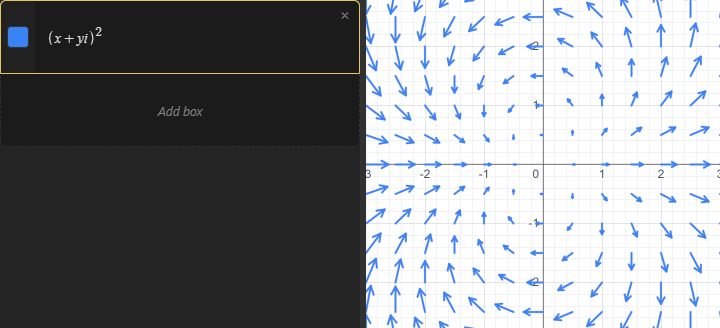
A complex-valued expression that uses both x and y is also drawn as a vector field: the real part becomes each arrow's x component and the imaginary part its y component. This gives a quick way to visualize a complex function over the plane: