
Iterate operator
The iterate operator feeds an expression's output back into its input a chosen number of times. Where other looping operators like Start sum from to , end sum, and for combine many independent terms, iterate uses the result of the previous step to compute the next one. That unlocks recurrences, numerical methods like Newton's method, and fractals.
Writing an iterate
Type iterate to insert the operator. It has three fields. The one inside the loop names the recursion variable and gives its starting value, for example g=1. Below and above it are the bounds of a counter, written like the bounds of a sum: the counter variable and its lower bound below, the upper bound above. The expression that follows the operator is the step.
For each value of the counter, the step is evaluated and its result becomes the new value of the recursion variable. The value of the whole operator is the final value of the recursion variable. The example below multiplies g by n five times, so it computes 5 !:
The step does not have to use the counter. The counter is then just a way of saying how many times to run:
The bounds are inclusive: the counter takes every value from the lower bound up to and including the upper bound, so the number of steps is the upper bound minus the lower bound plus one. If the upper bound is smaller than the lower bound the step never runs and the result is the starting value. The bounds can be any expression that gives a plain number, including a value defined in another box:
What counts as the step
Like Start sum from to , end sum,, iterate only uses the term immediately following it as its step. If the step is a sum of terms, it has to be wrapped in parentheses; otherwise only the first term is iterated and the rest is added to the result afterwards. With a=5:
Stopping early
The upper bound can be followed by a comma and a condition, such as 100, |z|<2. The condition is checked before every step, and the loop stops as soon as it is false, so the iteration runs until either the condition fails or the upper bound is reached, whichever comes first. The result is the value of the recursion variable at that point. The condition can use the recursion variable and the counter, and it can be a chain like 0<g<1.
A normal upper bound is still always required, even with a condition. It puts a hard limit on the number of steps, so an iteration can never run forever if the condition never fails.
Here the doubling stops at the first value that is not below 50, long before the cap of 100 steps.
Examples
Newton's method for StartRoot, 2 , EndRoot starts from a guess and repeatedly improves it. Five steps are already exact to the displayed precision:
The logistic map "p" maps to "r" "p" ( 1 minus "p" ) after fifty steps:
The recursion variable can be complex:
Vectors, matrices and arrays as the state
The recursion variable can be a vector or matrix, which lets a single iterate carry several values at once. Here a 2-vector holds two consecutive Fibonacci numbers, and each step shifts it along:
Multiplying by a matrix each step computes a matrix power:
The recursion variable has to keep the same type from one step to the next. Seeding the example above with the number 1 instead of the identity matrix is an error, because after one step g would be a matrix.
Arrays work the same way, and operations on the recursion variable apply to every entry:
Keeping every step
iterate gives you the final value only. To see the whole sequence, wrap it in a for operator whose counter sets the number of steps:
Each entry is a separate iteration from the start, so a long sequence costs more than a single iterate; for a short one that does not matter.
Iterate in graphs
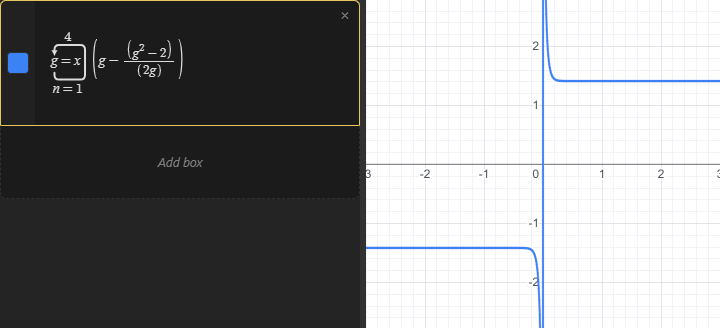
The seed and the step can use x, y or t, and the result is graphed like any other expression. Seeding with x makes the result a function of x. Below, four steps of Newton's method are run from every starting point x, so the curve sits at plus-or-minus StartRoot, 2 , EndRoot almost everywhere, apart from a spike near zero where the first step overshoots.
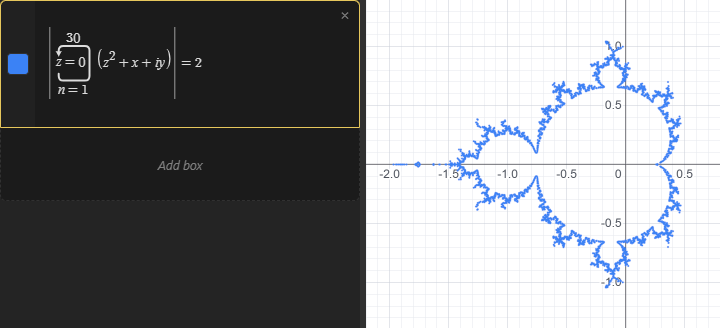
Inside an implicit equation, an iterate runs on your GPU for every pixel, which is what makes fractals practical. The Mandelbrot set is the set of points c for which iterating "z" maps to "z" squared plus "c" from zero stays bounded. Thirty steps and a threshold of 2 give a good approximation of its outline:
You can draw a Julia set instead by fixing the constant and seeding with the pixel, "z" equals "x" plus "i" "y".
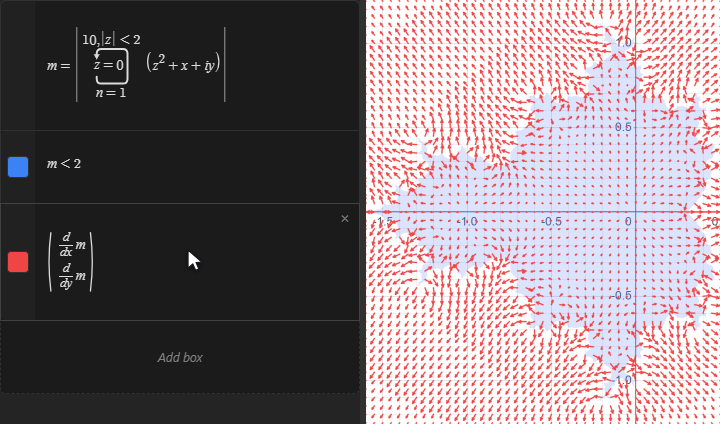
A stopping condition makes each pixel stop as soon as it escapes, so the iteration can run for many more steps without the escaped points blowing up. That also makes the result well behaved enough to differentiate. Here the magnitude of the escaped point is defined as m in one box, the set itself is filled in with the inequality "m" less than 2, and the gradient of m is drawn as a vector field with its density turned up. The arrows point away from the set and grow towards its boundary:
Because the whole iteration runs in single precision on the GPU, a very deep iteration of a chaotic map is limited by that precision; see the implicit equations page for what that means in practice.