
Implicit equations
Graphing an equation
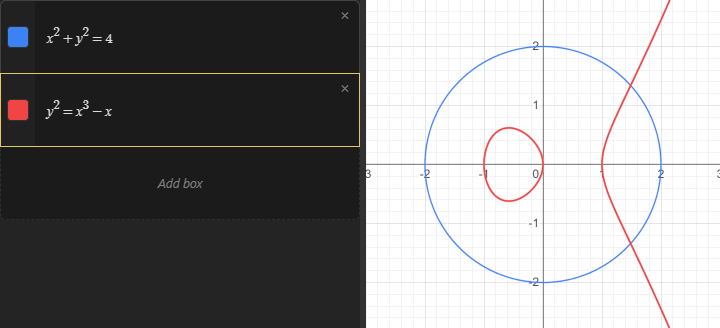
Any equation written as an equality in x, y or both is drawn as an implicit curve: the curve made of every point where the equation is true. The equation does not have to be solved for y, so shapes that are not functions of x, like circles, work just as well.

Every equality is drawn this way, even one that is equivalent to an explicit curve like "y" equals sin ( "x" ). The bare expression sin ( "x" ) is an explicit curve instead (see Intro to Graphing). Both draw the same shape, but implicit curves are drawn on the GPU, which gives them more limitations than explicit curves. See Limitations below.
Color, thickness and visibility work the same way as for any other graph: click the swatch to toggle the curve, right click or long press it to open the style menu.
Inequalities
Inequalities are graphed with <, >, less than or equal to or greater than or equal to in place of the =, and the calculator fills the region where the inequality holds. To type less than or equal to, type < followed by =, and the two characters combine into the single symbol; greater than or equal to is > followed by = in the same way. With less than or equal to or greater than or equal to the border is drawn as well, so the style menu has a Thickness control for the border in addition to the Opacity control for the fill.
A chain like negative 1 less than "x" less than 1 works as long as every relation in the chain is the same kind: mixing < and less than or equal to in one chain, or an = with a <, is an error.
Arrays of curves
Any equation that involves an array draws one curve for each entry, all in the same color. This is a quick way to draw a contour plot:
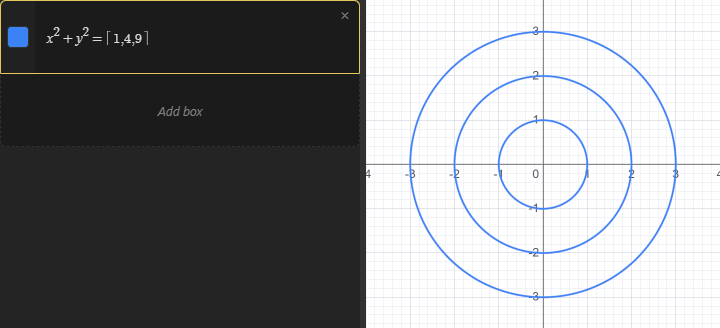
The same works with a for operator in place of the literal array. The number of curves has to be fixed: the bounds of the for cannot depend on x or y.
Limitations
Only sign changes are drawn
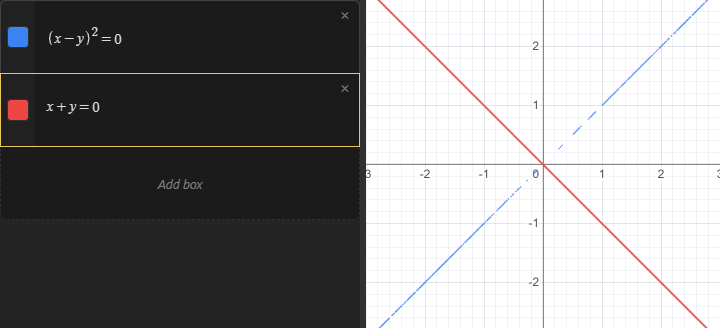
The calculator draws the curve where the difference between the two sides of the equation crosses zero. If the two sides touch without crossing, there is no crossing to find, and the curve is missing or appears only in scattered fragments. Squares are the usual cause: ( "x" minus "y" ) squared equals 0 has exactly the same solutions as "x" minus "y" equals 0, but only the second one draws reliably, and "x" squared plus "y" squared equals 0 is a single point that never appears. If a curve you expect is missing or broken, rewrite the equation so that it crosses zero instead of touching it.
Single precision
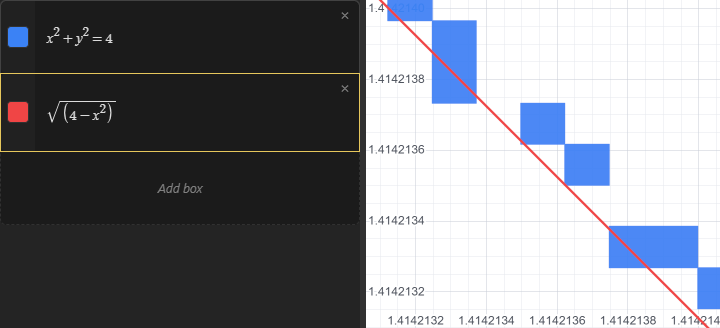
The GPU works in single precision, which carries about seven significant digits. The coordinates of every pixel, the value of every slider, and every intermediate value in the equation are all rounded to that precision before the sign test. At normal zoom levels this is invisible, but it shows up in two situations:
- Zooming in very far, or looking at a region far from the origin. Once neighbouring pixels are closer together than the seventh digit of their coordinates, the curve turns into steps, breaks up, or disappears. Explicit and parametric curves are computed in double precision on the CPU and are not affected, so when you need to zoom deep into "y" equals "f" ( "x" ), write it as the bare expression "f" ( "x" ) instead.
- Equations that lose digits, such as subtracting two large, nearly equal quantities, or very high-frequency terms. The difference between the two sides can come out as noise, which draws as a noisy or missing curve.
The snapping marker (hold the mouse on a curve to read off a coordinate) is computed on the CPU in double precision. For most equations it sits exactly on the drawn curve. For equations that are extremely sensitive to precision, like an iterate that runs many steps of a chaotic map, the double precision curve and the single precision one can differ visibly, and the marker will not follow the drawn line.
Not everything can run on the GPU
The equation is compiled into a program for the graphics hardware. Most of the calculator is available there: arithmetic and the standard functions, complex numbers, matrices up to 4 by 4, arrays, sums, products, for, iterate, derivatives and your own functions. A few things are not, and an equation that uses them shows an error in the box's status gutter instead of a curve:
- Determinants, inverses, division by a matrix, and matrix exponentials. If the matrix does not depend on x or y, compute the value in its own box and use that in the equation. Otherwise write the operation out by hand: the determinant of Start 2 by 2 matrix, Row 1: "a" , "b" ; Row 2: "c" , "d" , End matrix is "a" "d" minus "b" "c".
- Vectors and matrices larger than 4 in either dimension.
- Arrays of unknown size. A GPU program cannot build a list as it runs, so every array in the equation is unrolled ahead of time, with each entry becoming its own piece of the program. That means the length of an array cannot depend on x or y, and neither can the index used to pick an entry out of one. It also means a very long array makes a very long program, so keep arrays in implicit equations short.
- Very large expressions. A high-order derivative of a big matrix expression can exceed what a GPU program can hold. The error suggests lowering the derivative order or using smaller matrices.
Undefined regions
Where the equation is undefined there is simply no curve. This includes regions where a value is complex: if either side has a non-zero imaginary part, that point is skipped, so "y" equals StartRoot, "x" , EndRoot draws only where "x" greater than or equal to 0.